Tuesday, November 7, 2006

Take Notes before you code...

Notepad is noremally on the bottom of the list whenever a coder is being told of applications he can use to write his code in. Primarily because it's features are limited.

Some time ago I came across NotePad2 and slowly fell in love with it. Because I was able to write webpages using it and it was colour coded. It also colour codes XML, CSS, Java, C++ and other programming languages. I was laughed at and told to use EditPlus which also does the same thing but is a little more advanced and gives more features. EditPlus however, was not free ( baisc cost US$30) and based on that fact NotePad2 took the cake for me.

While browsing today - Nov.06.06 - I came across a few other applications that do the same thing - Intype, Textmate and Programmer's Notepad. Because I'm almost always looking for free applications I took a special interest in Programmer's Notepad.


I found Programmer's Notepad to be light, user friendly and has the following features:

  • Bookmarks (both numbered and plain)
  • Code Folding/Outlining
  • Docking tool windows - much better than those in version 1
  • Excellent external tool support with user-configurable
    output matching - click on errors and warnings to jump right to
    the place in the file where they were generated
  • Export to HTML (using CSS) and RTF
  • File association manager
  • In-file method/definition navigation (using Ctags)
  • No limit on file size (although large files may take a while
    to load)
  • Non fixed-width font support
  • Projects and Project Groups with multi-level folders and
    file system mirroring
  • Quick Search toolbar with links to Google and Google Groups
  • Regular expression search and replace
  • Support for unicode files
  • Support for windows, unix and macintosh file formats
  • Syntax highlighting for many languages through “schemes”.
  • Tabbed MDI interface
  • Text Clips
  • Unlimited number of schemes supported, powerful syntax
    highlighting supporting both user-defined and built-in schemes
  • User-defined schemes (XML)
  • Word-wrapping

I think the application is a nifty one and helps new comers to the coding world to better read and understand their code.


Product Sites:

Programmer's NotePad
URL: http://www.pnotepad.org/

Notepad2
URL: http://www.flos-freeware.ch/notepad2.html

Intype
ULR: http://intype.info/home/index.php

Textmate
URL: http://macromates.com/

Monday, October 23, 2006

Copy Cat...

When I initially started webdesigning I had the opportunity to work alongside indiviuals who were a little bit more familiar with the field. However, I took note that their personal website resembeled that of Macromedia's...done to the 'T'! And it puzzled me. Initially I figured that they would have downloaded one page and used that as their blue print. But my theory may be out the window.

Today, I downloaded an entire site in minutes, with all the files and working links. All with the use of a simple tool HTTrack Website Copier 3.40-2. I haven't used the application in detail jus' yet but, from what I've seen thus far, it's powerful and I know there are others of it's kind.

Basically what the application does is 'crawls' the website using the links on the 'Index' page. It then uses the text-links, image-links and embedded objects in the webpages that relate to the localhost and download the files. This can be prevented by using a 'robot.txt' and or '.htaccess' file that will prevent the application for going into diretories specified by the webmaster. Meta tags can also me used to tell the crawlers not to follow the links on the index page.

HTTrack Website Copier 3.40-2 is a useful tool in the hands of a webmaster but a threat if used by individuals with Malicious intent.


Official Website:
www.httrack.com

Thursday, October 19, 2006

Coming Zune...No iPods!

Microsoft is threatening the existence of iPod with it's new product Zune. Zune is like another top media player that is available today, with a few exceptions. Unlike the iPod it has a FM Radio, the capacity to download songs online, Wi-Fi Connectivity, Xbox Compatibility and custom background images. It also comes preloaded with media content.

I admit that having a media player that plays video and audion with the capability to stream content and connect wirelessly is kool. Not to mention that it has a 30GB HardDrive. Sweet! But with great features comes a hefty price tag - US$249.99.

I'm however displeased with the ad campaign of Zune. Take a look at this Ad. CLICK

I really don't think iPod is in any danger...but wait and see what tricks Apple has up it's sleave. Coz it ain't ova til the fat lady plugs in....LOL.


Official Website:
www.comingzune.com

Thursday, September 28, 2006

All I need is the Internet...

Have you ever had a file for an important project you wanted to share with another or edit but left it at the home or at the office? Yeah I know with the introduction of flash drives that shouldn’t be a problem, but some times you forget! What if you could save your documents in a central location that is accessible via the net wherever you go?!? Well, Google has an answer!

Google has an online beta word processing web application that allows users to create, edit and save documents. Writely is what’s it’s called! The user can export their documents in various formats compatible with Open Office, Microsoft Word, Acrobat Reader, Notepad and even a Web Browsers.

Writely, is a powerful tool that gives executives and small business people the freedom to work outside the office, once there is internet connection and saves them the worry of hard drive failures or powercuts since it saves a back up of your work every few seconds. Sweet!!!

As if this wasn’t enough, they also have Google Spreadsheet. This web application is nothing short of Microsoft’s Excel since it allows the use of formulas and the like. Google seems to be pulling out all stops!

What’s next, a web application to create presentation graphics? Anything is possible! But I must say 'All hail Google!' they are truly visionaries…taking technology to another level.


PRODUCT WEBSITE:
Writely - www.writely.com
Google Spreadsheets - www.spreadsheets.google.com

Friday, September 22, 2006

Bird of a Feather 'Flock' Together...

If you were supposed to ask anyone pc user “What are the top 3 web browsers?” I can guarantee you that Mozilla Firefox will be in the list. Known for its many useful and unique extensions, Firefox is a techie's best friend.

But now it seems that Firefox has a cousin, Flock. Though not created by the same company it mimics Firefox in many ways with the exception of a few perks.

Flock uses almost all the extensions and themes Firefox does, but allows users the power to upload photos to their flickr and photobucket accounts within a few clicks. It also facilitates blogging directly from the browser without having to go to your blog site and logging in (supports Drupal, Wordpess, Blogger and a few other blog sites). RSS feeds are no problem for this browser as well. It comes with a built in RSS Reader like IE 7.
One other feature Flock has is a clip board that allows the user to drag and drop snippets of text or even images while surfing, which can be accessed later in a session.

The icons and the GUI are modern, yet simple and sleek. I'm yet to do an extensive test with plugins and extenstions in Flock vs Firefox to see which uses more memory.

Off the bat Flock is a good browser, and is being marketted as "the social web browser" Even though it is in it's beta stage - Beta 1 vesion 0.7 - flock unleashes the power of Mozilla Firefox with useful tools for surfers.

Flock Web Browser's Website:
url: www.flock.com

Wednesday, September 20, 2006

Really Really Simple News Feeds...

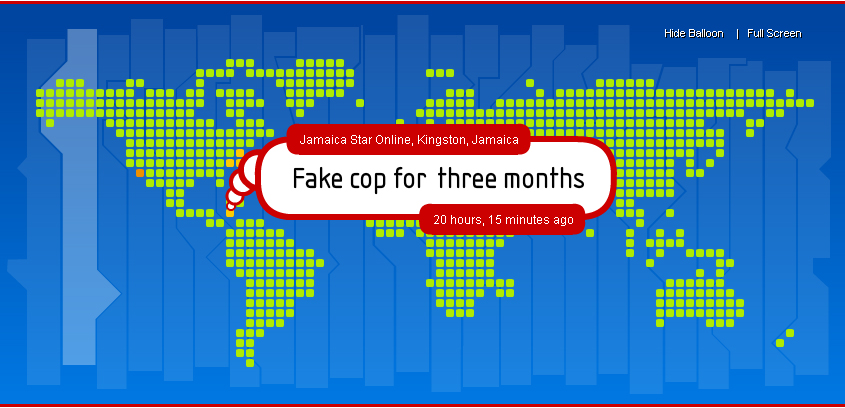
When it comes to RSS feeds there are many readers to choose from. The list is almost endless. And when you think it couldn’t get any better it did. No you can have an interactive desktop that displays your favorite RSS feeds and many more from around the world.

MappedUp is a new Shockwave based application which allows users to have their RSS feeds displayed interactively on their desktops. The application is tied to a service which is now in its beta stage - 0.9 - and free. It allows users to add 5 of their favorite RSS Feeds while having access to many more around the world.


There are 3 versions of the application (i) Desktop component (ii) Screensaver Component and (iii) Website Component. The Screensaver and Website component doesn’t integrate the setting of the user account but displays general RSS feeds around the world. These versions currently run on a Windows or Mac platform.

Pros
MappedUp’s desktop tool allows you to quickly view Headline News from various news networks around the world with ease. One of its many features is a bubble that pops up systematically and shows headlines along with the time and date added. This can be deactivated if it becomes to cumbersome for the user and the application will only display hotspots that are colour based and easily identified by a key.

The user can login from the desktop, view the system clock, see various time zones around the world and even set the application to scale according to the size of the display. Feeds can also be tailored to the users liking and if the users regular feeds aren’t listed it can be submitted. This can only be achieved by creating an account though.

With the MappedUp Screensaver application users are allowed to visit the page of the article when headlines are clicked on and doesn’t compromise you security settings if the pc is locked an has to be activated using a password. It also doesn’t stop being a screensaver when the mouse is moved, the user has to press the escape button on the keyboard.

The web component of MappeUp can prove to be useful tool on websites where users are interest in news and want to escape the hassle of downloading and installing the application

Cons
When the desktop component is installed there is no easy way to revert to your prior desktop nor is there any indication that the application was installed on the pc. The user is forced to go to the display options located in the Control Panel and manually choose the desired desktop. I’ve also noted that if the display exceeds 1024 x 768 there is a gray box on he lower left of the screen which cannot be removed. Strange!

The mere fact that the personalized feeds aren’t shown on the screensaver is a big disappointment. The web component doesn’t facilitate this either.

My Take
The application is a handy tool to have. Especially since it doesn’t hog memory or hinders the performance of the pc in any major way. It seems though that it is a tool that is more likely to be used by techies and individuals more interested in current affairs. I’d recommend it to any who is subscribe to various feeds however, if you are the type that likes to change there desktop regularly, it’s not for you.


MappedUp Official Website
url: www.mappedup.com

Thursday, September 7, 2006

The Genesis of Ignorance...

Being fairly young to web design/development there has been a lot of fundamentals that I’ve missed out on. Drag and dropping was my way of life, but the more involved I got the more I wanted to know. Clicking here and there wasn’t satisfying anymore and before I knew it I’m way past ankle deep.

Web design seems so easy today, especially with the use of web-authoring products such as DreamWeaver, but there is so much still to be learnt. I recently got ‘skolled’ in Search Engine Optimization (S.E.O). What exactly is this? It’s a list of best practices, endorsed by various search engines, like Google, Yahoo, MSN etc, which aids users to find relevant content on websites when searches are carried out. It other words, it makes it easier for the search engines to find content on sites, relevant to a users search and displays it in the results. I’ve learnt how important it is to use phrased keywords, descriptions, unique page names, and even scripts that will tell the search engine bots to return at suggested times based how frequent the content changes.

But this is where I am now. To get here I had to learn how to read and write HTML, CSS, and basic PHP. I also had to apply myself in learning SwishScript – a language used in SwishMax - which later allowed me to understand ActionScript – a language used in Flash.

I was so ignorant! I knew of RSS Feeds (Really Simple Syndication) and PodCasts, which are part of the push technology, but never really understood them. Push technology is based on the premise that ‘we’ll (the company/website) send the info to you’. However, one has to subscribe and have an application that will read and display the updated info once available. You don’t even have to go to the website! It has even reached the point of Screen Casts – videos periodically sent to you, the user, based on subscription. Way kool!!! Especially, if you spend a lot of time online like I do. Some say I vacation in ‘windows’.

I say all this to say! That though various programs will come along with their nifty user interfaces that allow the simple man to design website and even web apps we all will need an understand the roots, the origin, the engine that makes the boat move. Always look to the future with an appreciation for the past.