MappedUp is a new Shockwave based application which allows users to have their RSS feeds displayed interactively on their desktops. The application is tied to a service which is now in its beta stage - 0.9 - and free. It allows users to add 5 of their favorite RSS Feeds while having access to many more around the world.
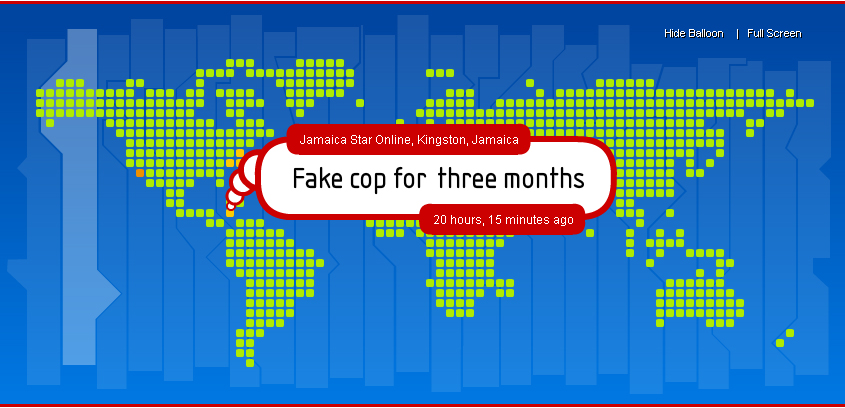
There are 3 versions of the application (i) Desktop component (ii) Screensaver Component and (iii) Website Component. The Screensaver and Website component doesn’t integrate the setting of the user account but displays general RSS feeds around the world. These versions currently run on a Windows or Mac platform.
Pros
MappedUp’s desktop tool allows you to quickly view Headline News from various news networks around the world with ease. One of its many features is a bubble that pops up systematically and shows headlines along with the time and date added. This can be deactivated if it becomes to cumbersome for the user and the application will only display hotspots that are colour based and easily identified by a key.
The user can login from the desktop, view the system clock, see various time zones around the world and even set the application to scale according to the size of the display. Feeds can also be tailored to the users liking and if the users regular feeds aren’t listed it can be submitted. This can only be achieved by creating an account though.
With the MappedUp Screensaver application users are allowed to visit the page of the article when headlines are clicked on and doesn’t compromise you security settings if the pc is locked an has to be activated using a password. It also doesn’t stop being a screensaver when the mouse is moved, the user has to press the escape button on the keyboard.
The web component of MappeUp can prove to be useful tool on websites where users are interest in news and want to escape the hassle of downloading and installing the application
Cons
When the desktop component is installed there is no easy way to revert to your prior desktop nor is there any indication that the application was installed on the pc. The user is forced to go to the display options located in the Control Panel and manually choose the desired desktop. I’ve also noted that if the display exceeds 1024 x 768 there is a gray box on he lower left of the screen which cannot be removed. Strange!
The mere fact that the personalized feeds aren’t shown on the screensaver is a big disappointment. The web component doesn’t facilitate this either.
My Take
The application is a handy tool to have. Especially since it doesn’t hog memory or hinders the performance of the pc in any major way. It seems though that it is a tool that is more likely to be used by techies and individuals more interested in current affairs. I’d recommend it to any who is subscribe to various feeds however, if you are the type that likes to change there desktop regularly, it’s not for you.
MappedUp Official Website
url: www.mappedup.com

No comments:
Post a Comment